How KidStory Works
Navigation: README | Diagram Architecture | How It Works | Database Schema | Challenge Requirements | Deployment
KidStory (ai.kidstory.app) is an AI-powered interactive storybook app for children aged 5–12. Kids speak or type a story idea, and the app generates a complete illustrated storybook with narration, quizzes, and personalized learning. The entire AI pipeline is orchestrated by 9 specialized agents built with Google Agent Development Kit (ADK) v1.0 (LlmAgent, FunctionTool, InMemoryRunner) running Gemini 2.5 Pro on Vertex AI.
Core Flow: Story Creation
Child speaks/types a story idea
    │
    ▼
[1] Safety Check (SafetyGuardian agent) — progress bar 0-100%
    ├── Keyword regex (instant) → blocks obvious unsafe content
    └── LLM safety check (Gemini) → blocks edge cases
    │
    ▼ (approved — 0 credits charged if blocked)
[2] Credit Deduction — 5 credits deducted server-side (Firebase Admin SDK)
    └── Only charged AFTER safety check passes
    │
    ▼
[3] Story Writing (StoryWriter agent)
    └── Generates title + 4-6 pages with text + imagePrompts
    │
    ▼ (parallel)
[4a] Illustration (Imagen via Gemini)     [4b] Narration (Google Cloud TTS)
    └── Sequential, 32s start-to-start gap       └── All pages in parallel
    └── Uses character reference photos        └── Voice: Aoede (default)
    │                                           │
    └──────────────┬────────────────────────────┘
                   ▼
[5] Cover Image Generation — shown in progress UI
    │
    ▼
[6] Save to Firestore + GCS
    └── Story appears in dashboard library
    └── updateStreak called (login also triggers streak)
Character Reference Images
When a child uploads a photo and names a character:
- Story writing: Character name is appended to the prompt → StoryWriter weaves the name into story text and imagePrompts
- Image generation: The uploaded photo is passed as
referenceImagesto Gemini's image model → each page illustration uses the photo as art style inspiration for that character - Result: The character appears consistently across all pages with a similar look
User uploads photo of "Mia"
    │
    ├── StoryWriter prompt: "...Characters: Mia"
    │       → Story text mentions Mia by name
    │       → imagePrompt: "A young character named Mia with..."
    │
    └── Image generation: photo passed as inlineData
            → Prompt: "Using the reference photos above as art style
               inspiration for 'Mia', generate..."
            → Each page illustration features Mia consistently
Quiz System
Screenshot: Quiz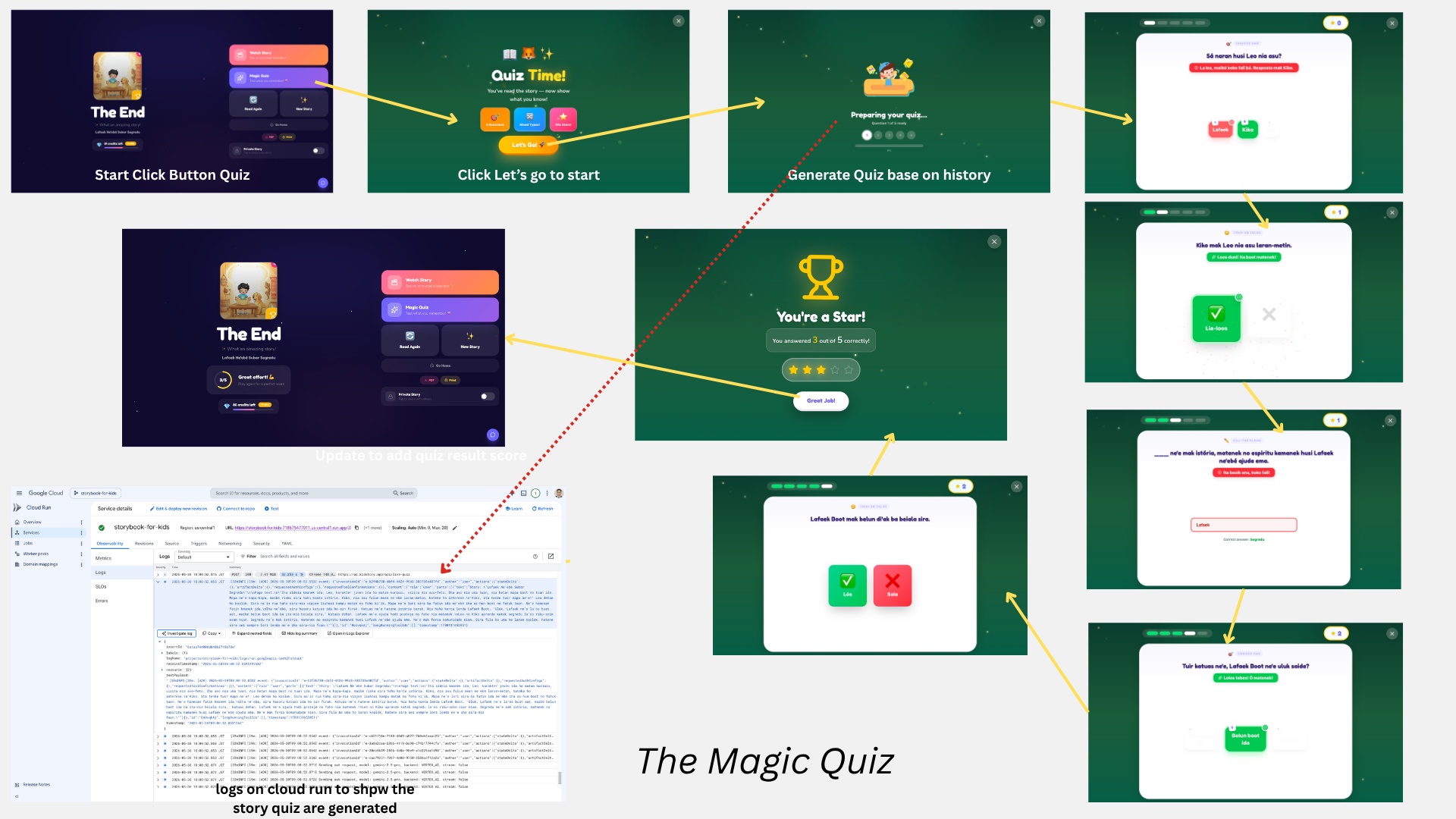
After reading a story, kids can take a "Magic Quiz":
- 5 questions generated in parallel (Promise.all) — no waiting between questions
- 3 question types rotated: multiple_choice → true_false → fill_blank → multiple_choice → true_false
- Fallback logic: If
fill_blankfails (common in non-English), retries once asmultiple_choice - Pre-generated feedback: Each question includes
encouragementandcorrectiontext — no second LLM call needed for feedback - TTS audio: Question text is synthesized to speech and auto-plays
- Score saved to Firestore for the LearningAdvisor and ParentInsights agents
previousQuestionsis always[]— each of the 5 parallel calls passes an empty list; deduplication relies on the agent's context (same page text) rather than explicit history
Personalized Learning
Screenshot: ParentInsights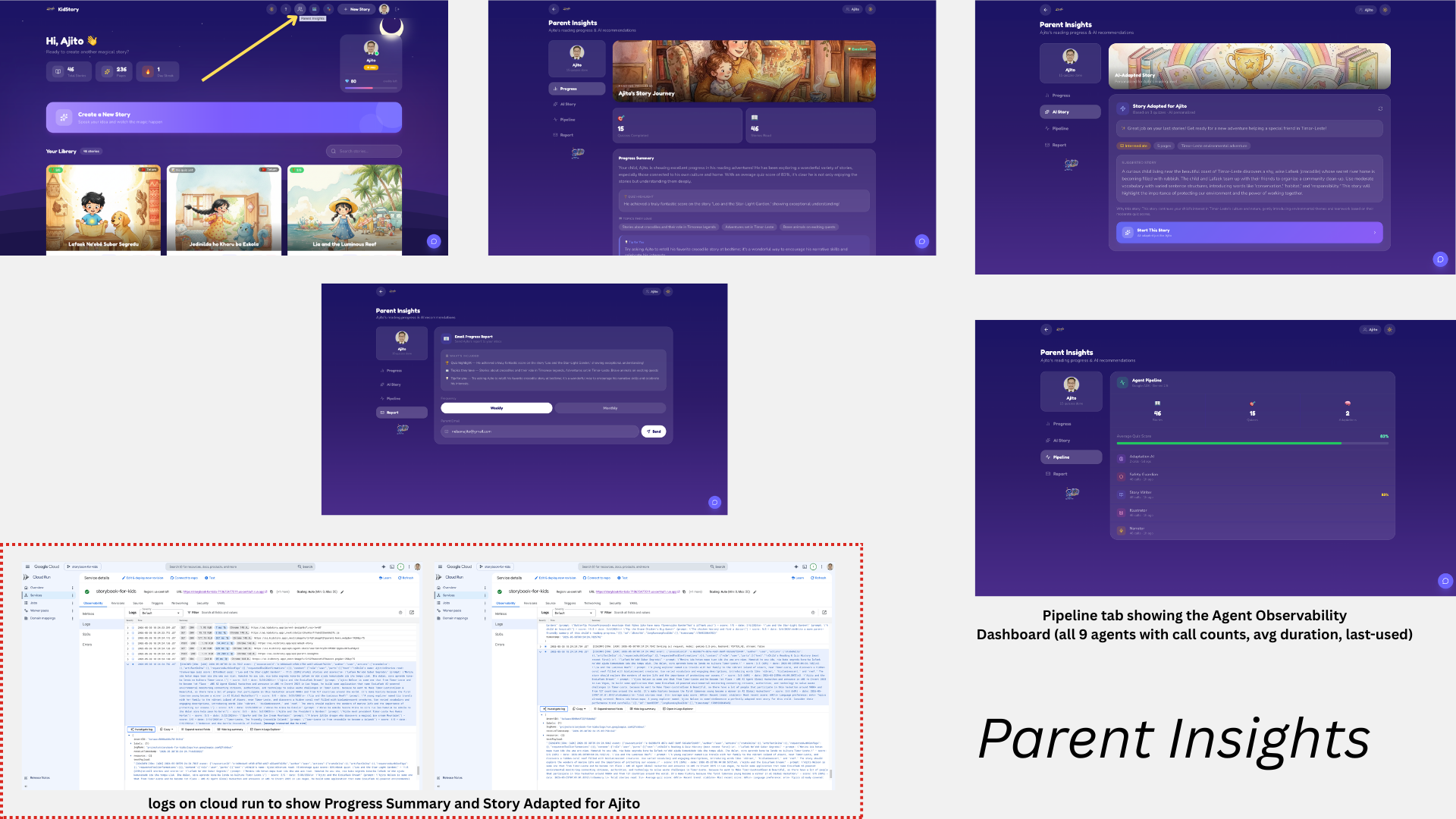
Three agents analyze quiz history to provide personalized recommendations:
LearningAdvisor (Dashboard)
- Reads last 10 quiz scores from Firestore (RAG with private data)
- Recommends difficulty level (easier/same/harder)
- Suggests 3-5 story themes based on what the child enjoys
- Cached per session — skips Gemini if no new quiz completed
ParentInsights (Parent Insights page — Progress tab)
- Generates a parent-friendly progress report
- Topics enjoyed, quiz highlights, encouragement tips
- Can be emailed to parent via Gmail SMTP
StoryAdaptation (Parent Insights page — AI Story tab)
- Reads last 3 quizzed stories from Firestore (RAG with private data)
- Generates a fully adapted next story: vocabulary level, page count, and a ready-to-use story prompt calibrated to the child's reading level and interests
- Vocabulary:
simple(<50% avg),moderate(50–79%),rich(≥80%) - Page count: 4 (struggling), 5 (average), 6 (advanced)
- Cached in Firestore — skips Gemini if no new quiz since last adaptation
- "Start This Story" CTA sends the adapted prompt directly to
/create
Key Features
| Feature | Description |
|---|---|
| Credit System | Free (30 credits/month) and Pro (150 credits/$4.99). Story = 5 credits, Quiz = 1 credit. Server-side deduction after safety check. Monthly auto-reset. |
| 21 languages | Story, quiz, narration all in the selected language |
| Voice input | Kids speak their story idea (Web Speech API) |
| Character photos | Upload photos for consistent character appearance |
| Page flip animation | 3D perspective-based page turn effect (PageTurn.tsx) |
| Achievements/Badges | 12 badges with custom .webp artwork (not emojis) |
| Story Map | Visual map (/story-map) showing where stories take place via keyword detection |
| Character Collection | Gallery (/characters) of characters extracted from story imagePrompts |
| Profile Page | User profile (/profile) with achievements, credits, personalized recommendations |
| Print Book | 🔜 Coming Soon — $9 USD per printed book, delivery to Dili, Timor-Leste |
| PDF download | Export story as a printable PDF book |
| Auto-read mode | Audio auto-advances pages like an audiobook |
| AI Story Adaptation | StoryAdaptationAgent reads last 3 quizzes → generates a ready-to-use story prompt calibrated to the child's level. Shown in Parent Insights → AI Story tab. Cached in Firestore. |
| Dark/light theme | Persisted preference across all pages, shared via localStorage("dashboard-theme") across dashboard and parent insights |
| Safety progress bar | Visual 0-100% progress during safety check |
| Cover generation | Dedicated cover illustration generated after page images; stored as images/{storyId}/cover.png. Shown in progress UI. See cover-generation.md. |
| Cost tracking | Dev-only token usage logging to log/ folder + cost-report.ts script. See cost-tracking.md. |
| Recommendation audio | LearningAdvisor encouragement text spoken aloud on Profile page via TTS; stored as recommendation/{userId}/insight.wav. See recommendation-audio.md. |
| Agent Observability Dashboard | Parent Insights → Pipeline tab shows all 9 agents with call counts, avg duration, last-used. Powered by GET /api/agent-stats. See observability-dashboard.md. |
| Shared navbar | DashboardNavbar component shared across all dashboard pages |
| Firestore security | Server-side rules in firestore.rules |
| Quiz fallback | fill_blank falls back to multiple_choice if generation fails |
| Reading Streak | Daily login streak tracked on users/{uid}. Increments on Google Sign-In and story save. Displayed as 🔥 stat on dashboard. See reading-streak.md. |
| Public sharing | Stories can be toggled public/private. Public stories get an OG meta page (/s/[id]) with cover image, title, and social share buttons (WhatsApp, Twitter, Facebook). |
| Sequential image generation | Page images generated one at a time with a 32s start-to-start gap in GenerationProvider.tsx — respects gemini-2.5-flash-image 2 RPM quota. |
| Mobile auth | Three-path auth in AuthProvider.tsx: (1) Native Android — Capacitor GoogleAuth.signIn() plugin, detected via isNativePlatform(); (2) WebView browsers (Facebook, Instagram, Line) — signInWithRedirect, detected via navigator.userAgent regex; (3) Real browsers (Chrome, Safari, desktop) — signInWithPopup. hCaptcha is skipped on native Android. |
Tech Stack
| Layer | Technology |
|---|---|
| Frontend | Next.js 16, React 18, TypeScript, Tailwind CSS, Framer Motion |
| AI/LLM | Gemini 2.5 Pro (Vertex AI), Google ADK v1.0 |
| Image | Gemini Flash Image model (Vertex AI) |
| Audio | Google Cloud TTS (Gemini Flash Preview TTS) |
| Database | Cloud Firestore (NoSQL) |
| Storage | Google Cloud Storage (signed URLs) |
| Auth | Firebase Authentication (Google Sign-In) |
| Deployment | Google Cloud Run |
| Observability | OpenTelemetry → Cloud Trace |
| Android app | Capacitor 6 + @codetrix-studio/capacitor-google-auth |
Observability
Every agent call is wrapped in an OpenTelemetry span (lib/observability/tracer.ts):
- Span name:
agent/{AgentName} - Attributes: model, language, duration_ms, success, agent-specific metrics
- Traces exported to Google Cloud Trace for debugging
The ADK itself also emits spans (gcp.vertex.agent instrumentation scope) with full LLM request/response details.
Android App
The web app is wrapped in a native Android shell using Capacitor 6. The app loads all pages from the deployed Cloud Run backend (https://ai.kidstory.app) — no static assets are bundled in the APK.
Key differences from the web app
| Web | Android APK | |
|---|---|---|
| Google Sign-In | signInWithPopup | Capacitor GoogleAuth.signIn() plugin |
| hCaptcha | Required | Skipped (isNativePlatform() check) |
| Page loading | From Cloud Run | Also from Cloud Run (via server.url) |
Auth flow on Android
User taps "Sign in with Google"
    │
    ▼
isNativePlatform() → true
    │
    ▼
GoogleAuth.initialize() + GoogleAuth.signIn()
    → Native Google account picker appears
    │
    ▼
googleUser.authentication.idToken
    → signInWithCredential(auth, GoogleAuthProvider.credential(idToken))
    │
    ▼
Firebase user created → saveUserToFirestore → updateStreak
Build
# From storybook-for-kids-app/
./build-android.sh

# Install on connected phone
~/Library/Android/sdk/platform-tools/adb install -r android/app/build/outputs/apk/debug/app-debug.apk
See android/README.md for full setup and troubleshooting.
Simulation & Testing
npm run simulateRuns 22 test scenarios across SafetyGuardian (11), StoryWriter (4), and QuizMaster (7) with real Gemini API calls. Used to validate agent behavior after instruction changes.